

Transform Screen Recordings into Expert Documentation
Turn a simple screen recording into polished user guides, searchable knowledge bases, onboarding manuals, and enterprise-ready documentation automatically.
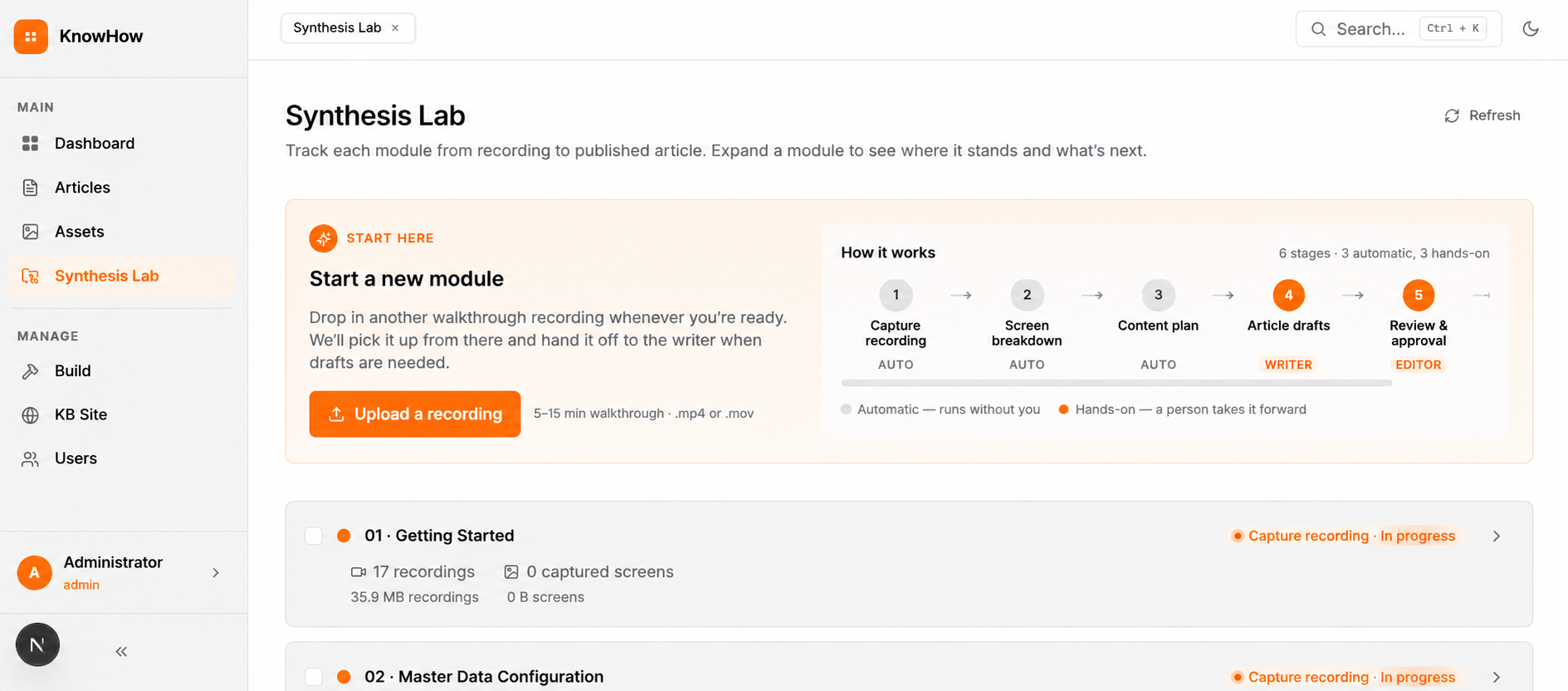



Documentation Shouldn’t Take Longer Than the Product Itself
Noho by Cloudnate AI helps teams convert short product walkthrough videos into structured, validated, role-based documentation without spending days writing technical manuals manually.
Upload a recording. Let Noho process the workflow. Publish professional documentation in minutes.
Noho eliminates that gap.
Using AI-powered transcription, frame extraction, structured synthesis, and validation workflows, Noho converts screen recordings into expert-grade documentation that can be published instantly as:
PDF manuals
Internal SOPs
Onboarding guides
Web-based knowledge portals
Searchable help centers
What Is Noho?
Noho is an AI-powered documentation platform that transforms screen recordings into structured documentation automatically.
Instead of manually:
Every Team Records Workflows. Very Few Document Them Properly.
Documentation is one of the most important operational assets inside a company — and one of the most neglected.
Most organizations already have walkthrough videos stored across shared drives, Slack channels, Loom links, and onboarding folders. But turning those recordings into usable documentation often requires pausing videos frame-by-frame, manually writing instructions, organizing screenshots, formatting PDFs, validating procedures, and repeatedly rebuilding the same process. As a result, documentation becomes outdated faster than teams can maintain it.
The Real Operational Problem
Software launches faster than documentation gets updated.
Teams release internal tools, workflows, and processes before support material is even ready.
Knowledge stays trapped inside recordings.
Critical operational expertise exists in videos nobody has time to convert into structured documentation.
Documentation quality becomes inconsistent.
Different departments create guides in different formats with varying levels of detail and accuracy.
Support teams answer the same questions repeatedly.
Because finding information inside videos is difficult, employees rely on tribal knowledge instead of searchable documentation.
STEP-1Upload the Recording
Upload a simple screen recording in .mp4 format, including product walkthroughs, SOP demonstrations, onboarding tutorials, HR workflows, compliance procedures, or technical support recordings. No scripting, editing, or manual preparation is required, making the process fast and effortless for teams of any size
From Screen Recording to Published Documentation
Noho’s “Synthesis Lab” automates the entire content lifecycle from video upload to enterprise-ready publishing.
STEP-1Upload the Recording
Upload a simple screen recording in .mp4 format, including product walkthroughs, SOP demonstrations, onboarding tutorials, HR workflows, compliance procedures, or technical support recordings. No scripting, editing, or manual preparation is required, making the process fast and effortless for teams of any size
Step-2 AI Extracts the Workflow
Noho automatically processes the uploaded recording using transcription engines, frame extraction, workflow detection, instruction synthesis, and intelligent step segmentation. The platform identifies meaningful user actions and converts them into structured, organized, and easy-to-follow procedural documentation.
Step-3 Generate Structured Documentation
Noho transforms the recording into step-by-step instructions, annotated screenshots, structured procedures, role-specific guidance, and searchable article modules. Instead of replaying lengthy videos repeatedly, users receive concise, readable, and actionable documentation that improves learning and operational efficiency.
Step-4 Validate Quality Automatically
Before publication, every document passes through Noho’s automated five-layer validation framework covering formatting consistency, readability analysis, technical structure, domain accuracy, and publishing compatibility. This ensures only complete, high-quality, and reliable documentation reaches end users and internal teams.
Step-5 Publish Everywhere
Publish documentation instantly as PDF manuals, searchable knowledge hubs, internal SOP libraries, web-based portals, or cross-linked help centers. Noho supports responsive documentation systems with full-text search, dark and light modes, modular navigation, and connected article structures for seamless accessibility.
Everything Teams Need to Scale Documentation
Noho isn’t just a transcription tool. It’s a complete documentation production system built for operational scale.
Transform walkthrough recordings into structured documentation automatically using AI-powered extraction, transcription, and workflow synthesis technologies that convert raw video content into organized, readable, and actionable procedural documentation.
Generate modular documentation tailored for employees, managers, HR teams, administrators, and technical operators. The same workflow can deliver role-specific guidance across multiple departments without duplicating content or rebuilding documentation manually.
Publish professional PDFs, web-based knowledge bases, internal SOP libraries, and responsive documentation portals from a single workflow source, ensuring consistent documentation delivery across every platform and operational environment.
Noho validates every document before publication using automated quality checks that ensure formatting consistency, readability, technical structure, and publishing accuracy across the entire organizational knowledge ecosystem.
Create full-text searchable documentation portals that allow teams to quickly access procedures, workflows, and operational guidance while scaling seamlessly across departments, distributed teams, and enterprise environments.
Monitor total documentation modules, workflow progress, validation status, publishing pipelines, and article completion metrics from a centralized operational dashboard designed for real-time visibility and enterprise-wide management.




We have 100K+ happy customer.
Built for Real Operational Workflows
Your organization launches a new HRMS or ERP platform and needs onboarding documentation immediately.
With Noho
Record a 5-minute walkthrough once.
Noho automatically converts it into:
- Onboarding guides
- Training manuals
- Searchable articles
- Employee-facing help documentation
Compliance & Quality Assurance
Scenario
Your industry requires documentation that follows strict formatting and procedural standards.
With Noho
Automated validation prevents incomplete or non-compliant content from being published, ensuring documentation consistency across the organization.
Scalable Internal Knowledge Bases
Scenario
Global teams need centralized access to operational procedures and technical instructions.
With Noho
Deploy searchable web-based documentation hubs with structured navigation, responsive layouts, and cross-linked workflows.
Technical Foundation Section
Enterprise-Ready by Architecture
Noho was built for scalability, reliability, and operational performance.
Core Architecture
Microservices-based architecture for high availability and modular scalability.
Technology Stack
Built using:
- FastAPI
- Next.js
- S3-compatible storage
- Whisper transcription
- FFmpeg video processing
Optimized for Scale
Designed to handle growing documentation libraries across enterprise environments without compromising speed or usability.
Why Teams Choose Noho
- Manual note-taking
- Screenshot-by-screenshot documentation
- Inconsistent formatting
- Long onboarding cycles
- Difficult-to-search video recordings
- Repetitive manual updates
- AI-generated instructions
- Automated frame extraction
- Standardized publishing
- Rapid documentation generation
- Searchable knowledge bases
- Centralized modular documentation
Your Entire Documentation Ecosystem in One Place
The Noho dashboard gives teams visibility into the complete documentation lifecycle. Track:
- Active builds
- Validation status
- Module progress
- Publishing workflows
- Documentation health
- Knowledge base growth
Frequently Asked Questions
Noho works with screen recordings including onboarding walkthroughs, SOP demonstrations, software tutorials, and operational training videos.
Yes. The platform extracts relevant frames directly from the uploaded recording during the synthesis process.
Absolutely. Noho supports responsive searchable knowledge portals in addition to downloadable PDFs
Yes. Every document passes through a multi-layer validation workflow for formatting, readability, technical quality, and compatibility
Yes. Noho supports modular documentation targeting different user groups and operational roles.
Yes. The platform was designed specifically for scalable internal documentation ecosystems and enterprise operational workflows.
Your Team Already Has the Knowledge
Stop letting operational knowledge stay trapped inside recordings, calls, and walkthrough videos.
With Noho, your team can transform workflows into scalable, searchable, validated documentation automatically.