

SNIP- Multi-Cloud Cost Intelligence That Finds What You Can Cut — Instantly
Stop Paying for Cloud Resources Nobody Uses
Scans your AWS, Azure, or GCP account and tells you —
What you can cut, resize, or remove and how much money you’ll save


Run a scan. Get a branded, finance-ready savings report the same day.
Idle gateways. Forgotten snapshots. Oversized compute. Unused load balancers. Zombie infrastructure from projects that ended months ago. Snip surfaces them automatically and ranks them by actual monthly savings potential.
- Read-only access
- No credit card required
- AWS | Azure | GCP supported
The Bill Keeps Growing. Nobody Knows Why.
Projects end but resources stay running. Temporary environments never get deleted. Old snapshots pile up. Load balancers sit unused for months. Finance sees the number increasing, but engineering teams don’t have time to manually investigate every service.
By the time someone notices, thousands of dollars may already be gone.
Cloud waste rarely appears all at once. It accumulates quietly.
Sound Familiar?
“The bill increased again.” Finance asks engineering for answers. Engineering spends days searching dashboards and usage reports — only to come back with partial visibility.
“Nobody knows what half these resources are.”
Legacy gateways, abandoned VMs, forgotten Lambda functions, and snapshots from old environments stay active because deleting them feels risky.
“The reporting takes longer than fixing the issue.”
Even when waste is discovered, turning findings into something leadership can actually act on usually means hours of spreadsheet cleanup and manual reporting.
“We had an idle NAT gateway running for eight months with zero traffic. We simply never knew to look for it.”
— Engineering Manager, Series B Startup
What Exactly Does SNIP Do?
Snip is a multi-cloud FinOps platform built for engineering, finance, DevOps, and leadership teams who need visibility into rising cloud costs without spending days manually auditing infrastructure.
The platform connects securely to your AWS, Azure, or GCP account using read-only access and analyzes: within their very first scan.
- Idle resources
- Overprovisioned infrastructure
- Underutilized services
- Orphaned cloud assets
- Native cloud advisor recommendations
- Rightsizing opportunities

From Cloud Account to Savings Report in Under Five Minutes
Snip was designed to remove friction from cloud cost optimization.
No complex onboarding. No agents. No write permissions. No infrastructure disruption.
Just connect, scan, and uncover savings opportunities immediately.
Create Your Account
Sign up in seconds and access the Snip dashboard. The onboarding experience is intentionally streamlined so teams can move from account creation to their first infrastructure scan without lengthy setup processes, technical barriers, or time-consuming onboarding sessions.
Choose Your Cloud Provider
Select your preferred cloud environment, including AWS, Microsoft Azure, or Google Cloud Platform. Snip automatically prepares the correct onboarding configuration and generates a deployment-ready Terraform package tailored specifically for your selected provider.
Configure Secure Read-Only Access
Download the pre-configured Terraform package and run the required Terraform commands to establish secure read-only access within your cloud environment. The process is designed to avoid destructive permissions, infrastructure modifications, and long-lived credentials while maintaining complete transparency over every granted permission.
Verify Connection & Start Scan
Click “Check Connection” to validate your environment using a secure read-only identity verification process. Once verified, Snip immediately begins analyzing your infrastructure in the background by aggregating cloud advisor recommendations, rightsizing insights, optimization findings, and internal intelligence into a unified savings engine.
Get a Ranked Savings Report
Within minutes, Snip generates a polished savings report that highlights total optimization opportunities, high-confidence recommendations, projected annual savings, detailed per-resource actions, executive-level summaries, and export-ready reporting formats for operational and leadership teams.


Everything You Need to Reduce Cloud Waste
Multi-Cloud by Design
SNIP is built with full multi-cloud support from the beginning, treating AWS, Microsoft Azure, and Google Cloud Platform as first-class environments. Teams can manage every cloud account through one centralized interface while viewing unified reports and ranked savings opportunities across all connected infrastructures.
Dollar-Ranked Recommendations
Every recommendation generated by Snip includes estimated monthly savings, confidence scoring, suggested optimization actions, resource classifications, and the original recommendation source. Findings are automatically prioritized so the highest-impact and most actionable savings opportunities always appear first.
Native Cloud Advisor Intelligence
Snip consolidates and intelligently deduplicates optimization findings collected from AWS Trusted Advisor, AWS Compute Optimizer, Cost Explorer, Azure Advisor, and GCP Recommender. This eliminates the need for teams to switch constantly between multiple cloud consoles and fragmented reporting systems.
AI-Written Executive Summaries
Snip automatically creates executive-friendly summaries powered by AI to help leadership teams understand optimization opportunities quickly. Reports include major savings opportunities, potential risk areas, service-level cost breakdowns, and clear recommendations designed for both engineering and finance stakeholders.
Finance-Ready Reporting
Generate polished and fully branded reports instantly in PDF, CSV, and JSON formats for operational reviews, executive presentations, and financial analysis. The reporting system is designed to minimize manual spreadsheet cleanup while making cloud optimization data easy to share across teams.
Lightweight Infrastructure
The platform operates using a lightweight and efficient architecture while continuously analyzing infrastructure for optimization opportunities. In many environments, the savings identified during the very first scan can significantly exceed the operational cost of running the platform itself.
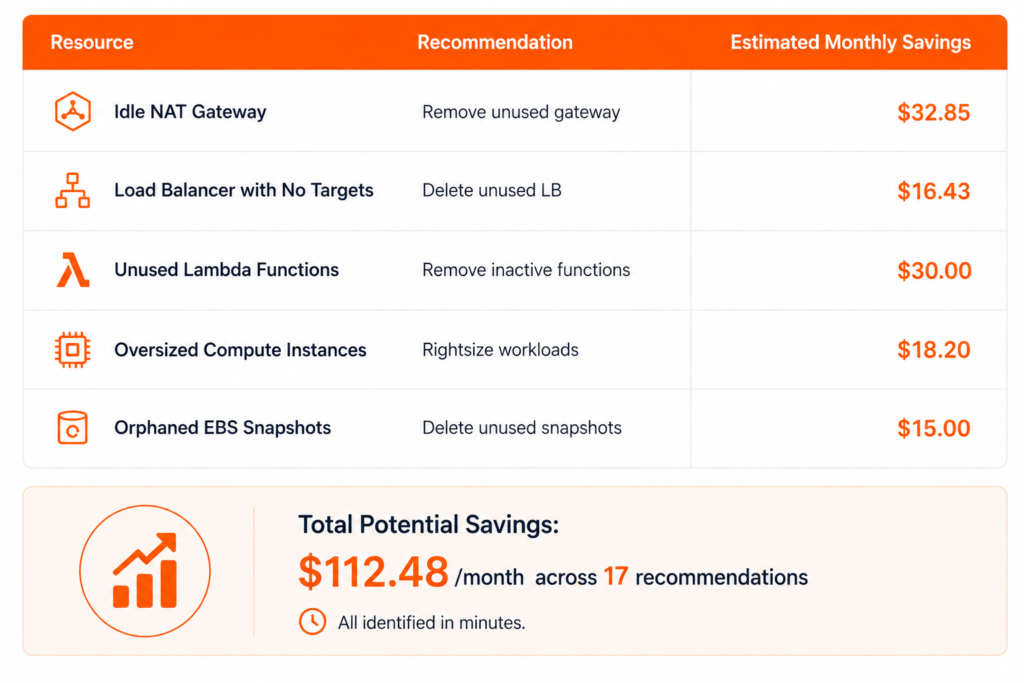
What Snip Actually Finds
Here’s an example from a real cloud scan:
Reports Built for Both Engineering and Finance
Here’s an example from a real cloud scan:
The executive dashboard provides four high-level KPIs that help teams quickly understand overall optimization performance across their cloud environments. Metrics include monthly savings potential, annualized savings estimates, total recommendation counts, and the number of high-confidence opportunities identified during analysis.
Snip automatically generates a concise business-focused summary designed for leadership visibility and faster decision-making. The summary highlights major optimization wins, the largest areas of unnecessary spending, immediate action opportunities, and important operational watch-outs requiring attention.
Every recommendation is organized within a sortable and prioritized table designed around estimated financial impact and optimization value. Each finding includes resource details, resource classifications, suggested remediation actions, projected monthly savings, confidence scoring, and the original recommendation source.
The platform supports instant export generation in multiple professional reporting formats, including PDF reports, CSV exports, and structured JSON outputs. These reports are designed to support finance teams, engineering operations, procurement reviews, and executive leadership discussions.
We Look at Your Cloud. We Never Touch It.
The platform was designed around least-privilege access and transparent trust models from day one.
External-ID Protection
AWS integrations include pre-generated external IDs to prevent unauthorized role assumption.
Fully Removable Anytime
Remove the integration from your environment instantly whenever you choose.
Read-Only Access Only
Snip cannot create, modify, or delete resources in your environment.
Transparent Permissions
Every permission required by Snip is visible in the Terraform template before deployment.
No Long-Lived Credentials
Authentication uses native cloud provider trust mechanisms instead of storing passwords .
Who Uses SNIP?
SNIP is designed for teams whose cloud spend has outgrown their visibility.
Engineering Managers
Find operational waste without dedicating weeks to manual audits.
DevOps & Platform Teams
Reduce unnecessary infrastructure while maintaining performance and stability.
Finance & IT Leaders
Get cloud cost reports that are understandable, actionable, and tied directly to real savings.
Startup Founders & CTOs
Identify quick wins before cloud spend becomes a scaling problem.
Multi-Cloud Organizations
Centralize savings visibility across AWS, Azure, and GCP environments.
Frequently Asked Questions
No. Snip only reads infrastructure metadata and billing intelligence using read-only permissions.
Most teams complete onboarding and run their first scan in under five minutes.
Snip currently supports: • AWS • Microsoft Azure • Google Cloud Platform
No agents are required. Snip uses cloud-native trust and API integrations.
Yes. The integration can be removed entirely from your environment at any time.
Yes. Snip is designed for growing startups, mid-market teams, and enterprise cloud environments with rising infrastructure costs.
Your Cloud Bill Is Telling You Something
Unused resources, oversized infrastructure, forgotten environments, and missed optimization opportunities can quietly increase your cloud costs. SNIP helps uncover and eliminate this waste before the next billing cycle hits.